

“Designing & Building End-to-End Solutions”
I began my career in sales and sales leadership before transitioning into Salesforce development. That background allows me to approach Salesforce differently than many developers — I start by understanding the operational problem, then design and build the technical solution to solve it.
Today I develop scalable Salesforce solutions using Apex, Lightning Web Components (LWC), and Flow automation to improve operational workflows, increase business visibility, and support complex business processes. My work focuses on translating real business challenges into practical, end-to-end Salesforce solutions that support critical operations across Salesforce environments.
I’m Carla — a Salesforce professional who specializes in designing and delivering end-to-end Salesforce solutions that drive meaningful impact, elevate both customer and user experiences, and support measurable business outcomes through enterprise-grade systems.
What sets me apart is my combination of technical development expertise and real-world sales leadership. I understand how organizations operate, how users think, and how revenue is generated — and I build Salesforce systems that reflect those realities with precision and efficiency.
Over the past decade, I’ve delivered solutions across Sales Cloud, Service Cloud, Experience Cloud, and Pardot (Account Engagement), with a focus on automation, integrations, process optimization, and scalable system design. I take pride in creating solutions that are not only technically sound, but also practical, intuitive, and aligned with the way organizations actually work.
I’m known for bringing a positive attitude to the teams I work with and building strong relationships across departments. I work well under pressure and enjoy tackling complex challenges while keeping things calm and productive. No matter the situation, I try to keep a smile on my face and focus on helping the team move forward.
I deliver expert-level services across:
Sales Cloud – lead capture, pipeline architecture, forecasting, revenue acceleration
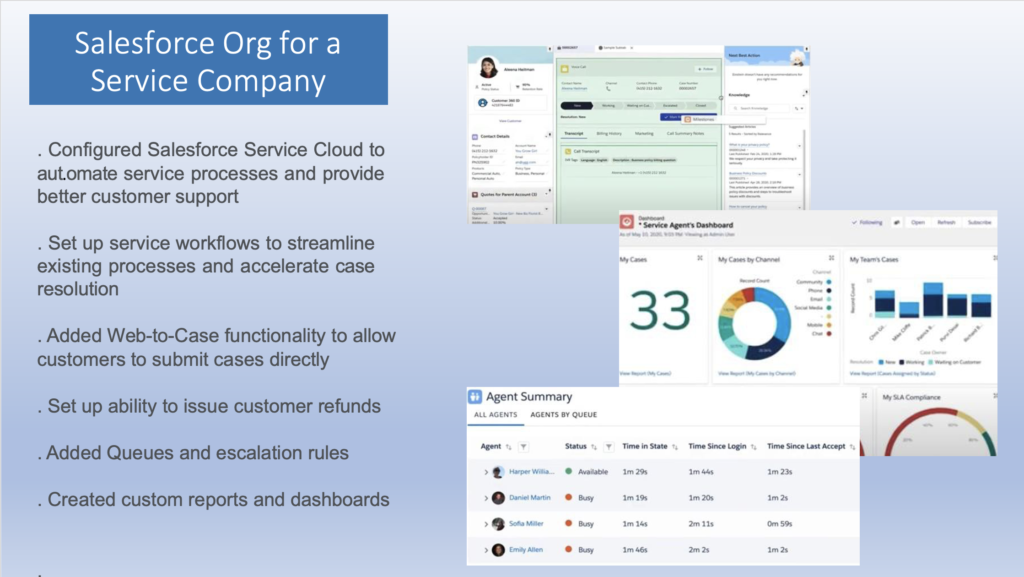
Service Cloud – case management, escalation workflows, omni-channel support
Pardot (Account Engagement) – campaign automation, lead scoring, nurture journeys, ROI metrics
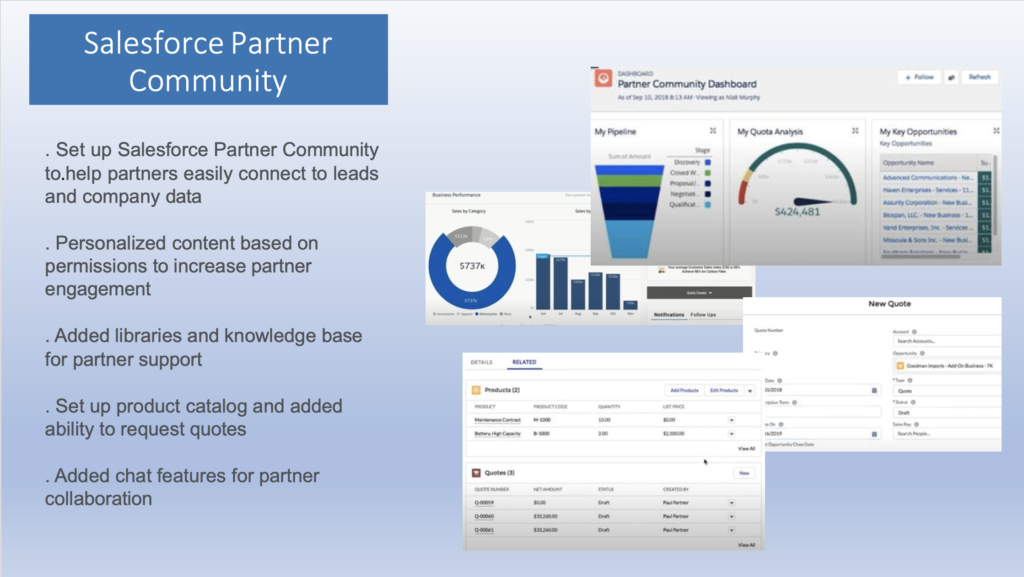
Experience Cloud – custom portals, automated onboarding, client access, departmental workflows
Platform Automation – Flows (record-triggered, screen flows, scheduled flows), Apex, validation logic
Security & Access Model – permission sets, role hierarchies, sharing rules, external access control
Reporting & Dashboards – executive metrics, KPIs, team scorecards
Quality Control Monitoring – automated client feedback cards, satisfaction surveys, and service follow-ups
Every solution is built with scalability, governance, data integrity, adherence to best practices, and long-term maintainability in mind.
I have architected and implemented multiple enterprise integrations, including:
• Twilio (Rest API & Apex) — automated two-way SMS communication
– outbound messaging triggered by Salesforce
– routing customer responses to specific departments
– automated notifications for sales, operations, and support
• Egnyte — automated document management with customized folder structures and synchronized file storage between Salesforce and Egnyte
• CloudFiles & PandaDoc — proposal automation, dynamic document generation, and PDF delivery
• Accounting & ERP Ecosystems — NetSuite integrations via Dell Boomi supporting financial data flows and operational synchronization
• Smart Apartment Data — automated lead and account creation from external property intelligence feeds
• Marketing System Integrations — email engagement tracking and real-time campaign data synchronization

“Examples represent real Salesforce solutions I have built. Some details have been modified to protect client and employer confidentiality.”
Problem
Operations were struggling to prioritize incoming estimates because there was no centralized way of determining which estimates required immediate attention. As a result, critical opportunities were sometimes delayed while lower-priority work was completed first, impacting proposal turnaround time and sales responsiveness.
Solution
Designed and developed a custom drag-and-drop queue management interface in Salesforce using Lightning Web Components. The solution provides location-specific queues and allows managers to assign priorities in real time, giving estimators a clear, shared view of which projects require immediate focus and improving overall proposal turnaround efficiency.
Technologies: Apex • Lightning Web Components (LWC)
Flexible Use Cases
The drag-and-drop prioritization component was originally designed to help estimators manage incoming estimates, but the same interface can support prioritization of Cases, Opportunities, Quotes, Jobs, or any custom object requiring real-time queue management and workload visibility.
Problem
Additional information from clients was often required in order to complete proposals and estimates. The process relied on manual communication between estimators, sales representatives, and the client. Estimators would request missing information from the sales team, who would then email or call the client to obtain the details.
Because these requests were handled through email and phone, there was no visibility into when information was requested or when it was actually received. As a result, estimators were often perceived as late delivering estimates even though the required information had not yet been returned by the client.
The lack of a structured workflow created delays, inconsistent communication, and limited accountability across the sales and estimating process.
Solution
Designed and implemented a custom RFI Management workflow using a custom related Salesforce object. Requests can be generated directly from Salesforce, which automatically sends the external recipient a secure link to complete a form on a digital site.
External recipients can provide the requested information without requiring Salesforce access. Once the form is submitted, responses automatically update the corresponding request record in Salesforce, update the request status, and notify the requester.
This created a fully traceable request–response workflow, providing clear visibility into when information was requested and when it was returned, while eliminating manual email tracking between teams.
Technologies: Custom Objects • Experience Cloud (Digital Site) • Salesforce Flow • Apex Automation • Email Notifications
Flexible Use Cases
This request–response workflow can support many scenarios where structured information must be collected from individuals without Salesforce access. Examples include RFI/RFP responses, vendor questionnaires, surveys, engineering approvals, customer support, client intake forms, or any information collection.
Problem
When Opportunities moved to the “Closed Won” stage, an integration passed project data to the ERP system to initiate billing. However, accounting teams often lacked the invoicing and billing instructions required to begin the process. As a result, accounting frequently had to chase the sales team for missing information, delaying invoicing and slowing project onboarding.
The challenge was that invoicing instructions were not always structured data. In some cases billing required an email address, while other clients required submission through billing portals or included additional invoicing instructions. The business also preferred not to add multiple new fields to the Opportunity object and instead required billing instructions to be captured in a single long text field formatted for the ERP integration template.
Solution
Developed a custom Lightning Web Component that launches a structured invoicing form directly from a button on the Opportunity record. The component allows users to enter billing details and special instructions in a guided interface while keeping the Opportunity object clean.
Validation ensures that Opportunities cannot be marked Closed Won until the component has been completed.
The entered data is automatically written to a long text field formatted specifically for the ERP integration, ensuring the information syncs correctly with downstream financial systems. This approach provided flexibility for varying invoicing requirements while ensuring accounting receives complete billing instructions when deals are finalized.
Technologies: Lightning Web Components (LWC) • Apex • Validation Rules
Problem
Event coordination was managed through spreadsheets and manual communication between departments. Marketing teams were responsible for tracking event requests, monitoring event costs, and manually comparing expenses against available budgets for each event category.
Because event costs and budgets were tracked outside the system, leadership had limited visibility into how funds were being allocated and how much budget remained for future events. Marketing teams also had to manually add approved events to multiple calendars, creating delays, missed events, and inconsistent visibility across the organization.
This fragmented process required significant manual coordination and made it difficult to enforce budget controls or maintain accurate event tracking.
Solution
Designed and implemented a custom Event Request Management system in Salesforce using a custom object that allows users to submit event requests and add attendees directly within the platform.
Each request captures the event category, expected cost, and attendee information. Event budgets were stored separately and visible only to leadership, allowing decision-makers to evaluate requests against the remaining budget before approving new events.
An automated approval process routed requests for review, with additional leadership approval required when a request exceeded the allocated budget.
Once approved, Salesforce automatically generates the event and distributes it to shared calendars using Apex and integrations with Microsoft Outlook and Microsoft Teams, ensuring all attendees receive real-time calendar updates.
The system centralized event requests, attendee tracking, and scheduling while providing leadership with controlled visibility into event spending and budget utilization.
Technologies: Custom Objects • Salesforce Flow • Apex • Approval Process • Microsoft Outlook & Teams Calendar Integration
Problem
Operational teams needed a reliable way to track hours worked at active job sites. Time was often submitted manually after workers left the site, creating inaccuracies in reported labor hours and making it difficult for leadership to verify where work was actually performed.
Without location validation, hours could be logged incorrectly or delayed, creating challenges for operational reporting, payroll reconciliation, and job-level performance tracking.
Solution
Designed a custom hours tracking workflow in Salesforce that allowed users to log time associated with active job sites.
The system leveraged location data and geofencing tied to job site coordinates sourced from Enverus, enabling the platform to validate whether users were within the defined job site boundary when submitting hours.
Submitted hours were automatically associated with the corresponding job record in Salesforce and aggregated through reporting dashboards, giving leadership real-time visibility into labor activity across field locations.
This improved accuracy of time reporting, reduced manual reconciliation, and provided greater operational accountability.
Technologies: Custom Objects • Salesforce Flow • Geolocation / Geofencing Integration • Reports & Dashboards
Problem
Regional managers needed daily visibility into operational performance across multiple locations, including job counts and revenue totals. This information was typically shared through emails or spreadsheets, which were often overlooked or buried in inboxes.
Because the data was not easily accessible while traveling between locations or working in the field, leadership lacked a quick and reliable way to monitor daily operational performance.
Solution
Designed and implemented an automated SMS reporting system integrated with Salesforce using the Twilio API.
Apex logic aggregates daily operational metrics—including job counts and revenue totals by location—and sends the data through the Twilio API. Twilio then delivers a formatted mobile-friendly report directly to regional managers via text message each morning.
Each message is also logged back to the related Salesforce record, ensuring communication history is stored and visible within the platform.
This solution provided leadership with immediate visibility into operational performance without requiring them to log into Salesforce or search through email reports.
Technologies
Apex • Twilio API Integration • Scheduled Automation • Salesforce Data Aggregation
Flexible Use Cases
This integration pattern can support many operational workflows such as executive reporting, field service updates, customer notifications, appointment reminders, incident alerts, or operational performance reporting delivered via SMS.
Salesforce Professional with 8 years of experience designing, developing, and delivering scalable Salesforce solutions. Proven success translating complex business requirements into technical solutions that improve operational efficiency, data integrity, and business visibility.
Brings a unique combination of Salesforce development expertise, sales operations experience, and business process leadership, enabling effective collaboration with stakeholders at every level of the organization. Known for bridging the gap between business and technology by designing solutions that not only meet technical requirements but also drive adoption, improve workflows, and support strategic decision-making.
Experienced in designing scalable automation architectures to support end-to-end lifecycle processes. Expert at translating complex business requirements into technical solutions that drive efficiency, improve data integrity, and support operational decision-making.
CORE SKILLS
Salesforce Developer / Platform Owner
Camp Construction
Houston, TX
Salesforce Administrator / Developer
Nine Energy Service
Houston, TX
Salesforce Administrator / Developer
Viking Service Group
Houston, TX
Director of Business Development
Viking Service Group
Houston, TX
Sales Manager
Stratus Building Solutions
Houston, TX
Account Executive
Jani-King International
Houston, TX
Let’s Collaborate on Your Next Big Idea
Your next project deserves strategic planning, expert execution, and measurable outcomes — let’s make it happen.